
About
App version
v2.0
What's new
Single Sign-On
Users can now sign into any Dragonfly AI application using a single set of sign in details.
iOS 14 support
Bug fixes and performance improvements for iOS 14
iOS 13 support
Bug fixes and performance improvements for iOS 13
Safari sharing
A Dragonfly option will now be available in the share feature in the iOS Safari app. This enables you to share your current safari web page directly to the URL view on the Dragonfly app. When using this feature for the first time you will need to enable the the Dragonfly app within the Safari export options. Please use the following instructions below:
-
Select the export feature in Safari, this will open the Safari menu options, please select the 'More' option


-
Scroll through the list of app 'Activities' and enable the Dragonfly app
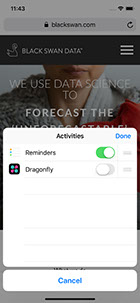

-
This will now enable the Dragonfly app to appear in the main export menu

-
One this has been set up to share Safari web pages simply browse to your preferred web page, select the export button in Safari and select the Dragonfly app, this will automatically launch the Dragonfly app and the URL view.
URL sharing
This feature enables you to create and share URLs via email or other apps that can instantly launch the Dragonfly app and the load the selected URL in the URL view.
You can do this by simply replacing the HTTP protocol at the beginning of the url with the word dragonfly, so for example:
Original URL: https://dragonflyai.co
Amended URL: dragonfly://dragonflyai.co
This can then be pasted into safari or selected from a document that contains hyper-links, where it will automatically launch the Dragonfly app. The URLs can also be shared and launched directly from an email app
UI update for multi-region analysis
Improved UI for mutli-region analysis. When defining multiple regions for analysis, the current region is now highlighted with the a pink border
Info section updates
New content added to Info section, this includes:
- Introduction
- Getting started
- Input content
- Analysis types
- Analysis tools
- Interpretation
- Optimisation examples
- FAQs